ui: vocabulary.Run it as a GUI with a simple HTML web component.
Run it in a terminal with a single command.
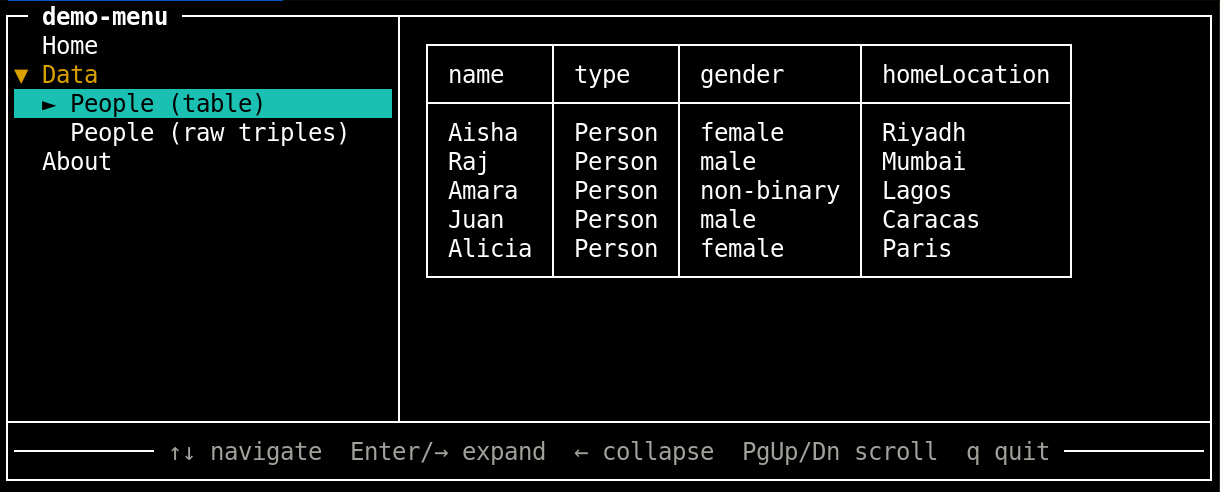
Given the same RDF menu definition as the GUI, the following command in a terminal :
$ node sol-menu-cli.js data/demo-menu.ttl#MainMenuProduces this interactive menu
This is the full HTML to load the live demo
<script src="../dist/vendor/@comunica-query-sparql.umd.js"></script>
<script src="../dist/solid-web-components.bundle.min.js" type="module"></script>

<sol-menu from-rdf="../data/demo-menu.ttl#MainMenu"></sol-menu>
The sol-menu web component can be used with a single from-rdf attribute. The value is a URI with a fragment identifier (e.g. menu.ttl#MainMenu) pointing to the root ui:Menu subject.
The selected menu item can be shown in an inline panel or if the RDF menu definition specifies a ui:displayTarget, it will be shown there instead.
ui:Menu
  ui:label       # (required) display name
  ui:parts       # (required) ordered rdf:Collection of ui:Link, ui:Component, and/or ui:Menu items
  ui:orientation # (optional) "horizontal" (default) or "vertical"
  ui:linkTarget  # (optional) CSS selector; content renders there instead of the built-in panel

ui:Link
  ui:label       # (required) display name
  ui:href        # (optional) URL to load (via handler component or default sol-include)
  ui:contents    # (optional) literal HTML rendered inline directly
  ui:handler     # (optional) a ui:Component used to render the href
  ui:icon        # (optional) icon URL

  note: a ui:Link must have either a ui:href or a ui:contents triple.

ui:Component
  ui:label       # (required) display name shown in the menu
  ui:name        # (required) custom element tag, e.g. "sol-query"
  ui:attribute   # (optional) schema:PropertyValue pairs passed as element attributes
                 # e.g. [ schema:name "sparql" ; schema:value "SELECT ..." ]
  ui:icon        # (optional) icon URL

  note: a ui:Component is self-contained — it carries its own tag and attributes.
  The consuming application must load or define the named custom element.